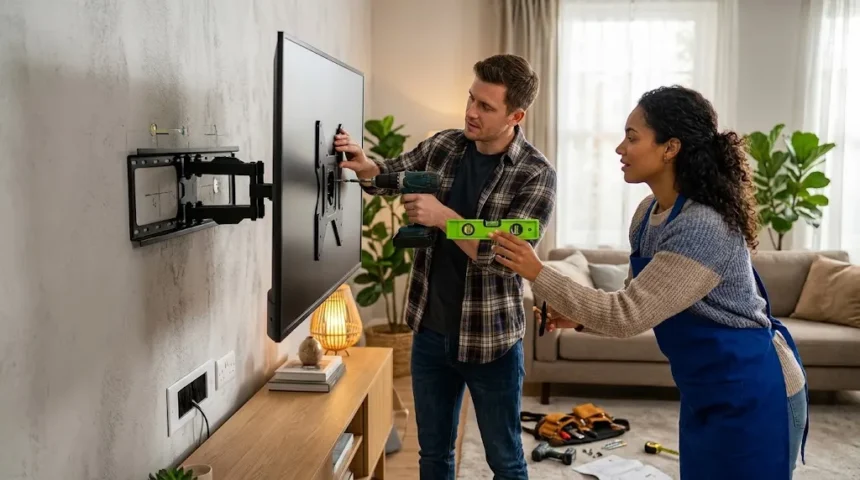
How to Mount a TV on the Wall Safely & Easily
Mounting a television on the wall can transform a room by creating a cleaner appearance, freeing up furniture space, and positioning the screen at a more comfortable viewing height. The project is manageable for many homeowners, but the installation needs to be planned carefully because modern TVs can still be heavy and fragile. A secure installation depends on choosing the correct wall mount, understanding the wall structure, locating suitable attachment points, and using hardware rated for the television’s weight. Rushing any of these steps can lead to damaged drywall, an uneven screen, or a dangerous fall. Good preparation makes the process both safer and considerably easier.
Before buying a TV wall mount, you need to know the television’s screen size, weight, and VESA mounting pattern. VESA measurements describe the horizontal and vertical spacing between the mounting holes on the back of the television. A mount must support both the VESA pattern and the total weight of the TV. You should also decide whether you want a fixed mount, tilting mount, or full-motion TV bracket. Each design affects how far the television sits from the wall and how easily its viewing angle can be adjusted. Choosing the right mounting system first prevents many installation problems later.
The wall itself matters just as much as the mount. Many homes use drywall attached to wooden or metal studs, while others have brick, concrete, block, or plaster walls. A television should never be attached with ordinary lightweight drywall anchors simply because they fit the mounting holes. Heavy loads need suitable structural support, which may mean fastening into studs or using properly rated masonry hardware. Electrical wiring and plumbing can also run behind walls, so drilling locations should be selected cautiously. Knowing what is behind the surface is an important part of safe TV installation.
Viewing comfort should also influence the position of the screen. Mounting a TV too high can force viewers to tilt their heads upward for long periods, especially in bedrooms and living rooms where people watch for hours. The center of the screen is generally most comfortable when it is reasonably close to seated eye level, although furniture arrangement and viewing distance can change the ideal position. TVs installed above fireplaces often end up higher than normal, which deserves extra consideration. Heat exposure, fireplace clearances, and neck comfort should all be evaluated before choosing that location.
This guide explains how to mount a TV on the wall safely, from choosing the correct bracket and finding wall studs to measuring, drilling, attaching the mounting plate, hanging the television, and hiding cables. It also covers drywall, brick and concrete installations, common mistakes, viewing height, cable management, and situations where professional installation may be the safer choice. The objective is to help you approach the project methodically instead of relying on guesswork. Every wall and television is slightly different, so manufacturer instructions should always remain part of the process. A careful installation can provide years of secure and comfortable viewing.
Choose the Right TV Wall Mount
The first step is choosing a TV wall mount that is rated for both the size and weight of your television. Mount manufacturers usually specify a compatible screen-size range, but weight capacity is the more important safety number. A mount designed for a 55-inch television may not necessarily support every 55-inch model because TVs vary in weight. Check the television specifications and compare them with the mount’s maximum supported load. It is sensible to leave some capacity margin rather than choosing hardware operating at its absolute limit. Never assume that a bracket is strong enough simply because the mounting holes appear to line up.
You also need to confirm VESA compatibility. The VESA pattern is normally expressed in millimeters, such as 200 × 200, 400 × 200, or 400 × 400. These measurements describe the spacing between threaded mounting holes on the back of the television. Many modern wall mounts support several VESA patterns through adjustable vertical rails. However, very small, unusually large, or specialized televisions may require particular brackets. Checking VESA dimensions before installation prevents the frustrating situation where the wall plate is already installed but the TV rails cannot attach correctly.
A fixed TV mount holds the screen close to the wall and is usually the simplest and lowest-profile option. It works well when viewers sit directly in front of the television and the viewing position does not need frequent adjustment. Fixed mounts also contain fewer moving components, which can make them easier to install and keep level. Their main disadvantage is limited access behind the television. Connecting new cables after installation can therefore be inconvenient. If your HDMI ports face backward rather than sideways, make sure enough clearance remains for connectors before choosing an ultra-slim mount.
A tilting TV mount allows the upper portion of the screen to angle slightly away from the wall. This can be useful when the television is mounted above seated eye level because tilting can reduce some viewing discomfort and reflections. It can also create additional space behind the screen for cable access. Tilting brackets are often a practical middle ground between fixed and full-motion designs. However, tilting cannot fully compensate for a television installed excessively high. Viewing height should still be planned carefully instead of relying on the bracket to solve poor positioning.
A full-motion TV mount, sometimes called an articulating mount, allows the television to extend outward, swivel sideways, and often tilt. This is useful in open rooms where viewers watch from different positions or when a screen is mounted near a corner. Full-motion brackets place greater leverage on the wall when extended, so structural attachment becomes especially important. The wall plate must be installed exactly according to the mount manufacturer’s requirements. These systems are also heavier and more complex to level. For large televisions, having two people install and adjust the assembly is strongly recommended.
Gather the Tools and Prepare the Work Area
A successful TV installation begins with having the correct tools available before lifting or drilling anything. Common tools include a tape measure, pencil, level, screwdriver, socket wrench, power drill, suitable drill bits, and a reliable stud finder. You may also need a small socket set because many wall mounts use lag screws with hex heads. A painter’s tape roll can be useful for marking positions without drawing heavily on finished walls. For masonry installations, a hammer drill and masonry bits may be required. The exact tool list depends on the wall material and the mounting hardware supplied with the bracket.
A stud finder is especially useful on drywall-covered walls because most heavy TV installations rely on wooden studs for secure attachment. Electronic stud finders can locate changes in wall density, but they are not infallible. Confirm suspected stud positions by scanning from both directions and considering likely framing spacing. Electrical outlets are often attached near studs, although this should not be treated as proof of exact location. Some tools can also warn about live electrical wiring. Accurate stud identification is worth taking time over because a lag screw that misses the framing may provide far less support than expected.
Clear the installation area before beginning. Move furniture, decorations, and fragile objects away from the wall so there is enough room for two people to work comfortably. Place a soft blanket, clean rug, or protective surface nearby if the television needs to be laid face down while mounting rails are attached. Avoid placing pressure directly on the screen. Modern panels can be extremely thin and may crack from twisting or concentrated force even when the television itself is not especially heavy. Keep mounting hardware organized so that bolts and spacers do not become confused during assembly.
Disconnect the television before attaching anything to it. Remove the power cord, HDMI cables, antenna connections, USB accessories, and other attached devices where practical. If the TV has a removable stand, follow the manufacturer’s procedure to take it off before mounting. Some stands use screws close to the VESA holes, while others connect through a different part of the chassis. Keep the original stand and its hardware in a labeled container in case the television is later moved back to furniture. This small organizational step can save considerable frustration years later.
It is also smart to read both the TV manual and wall-mount instructions before drilling. Mounts can differ significantly in hardware, required hole diameter, minimum stud spacing, and assembly order. Some brackets use separate locking screws or pull cords that secure the television after it is hung. Missing these final safety steps can leave the screen vulnerable to being lifted accidentally from the wall plate. The installation instructions may also specify particular spacers for curved or recessed television backs. Following the supplied hardware guidance is safer than improvising with random screws from a toolbox.
Find the Best Height and Position for the TV
Choosing the correct TV mounting height should happen before you mark any drill holes. A common starting principle is to keep the middle portion of the screen reasonably close to eye level when viewers are seated in their normal position. The exact measurement varies because couch height, screen size, reclining angle, and viewing distance all affect comfort. Large televisions extend farther above and below their center point than smaller models. Instead of following one universal number, sit where you normally watch and visualize the screen at several possible heights. Comfort should take priority over decorative symmetry.
Viewing distance also matters when planning the position. Larger 4K televisions can generally be watched comfortably from closer distances than older lower-resolution displays because individual pixels are less visible. However, sitting too close to an extremely large screen can require more head and eye movement. Room layout often determines the practical distance more than technical recommendations do. Position the television so most seats have a direct and comfortable view. If the room has multiple viewing zones, a swivel mount may provide more flexibility than positioning the screen permanently toward one area.
Reflections should be evaluated before drilling. Windows, lamps, and overhead lighting can create distracting glare on glossy television screens. Temporarily marking the proposed screen area on the wall with painter’s tape allows you to observe reflections at different times of day. A small horizontal adjustment can sometimes make a meaningful difference. Tilting mounts may reduce certain reflections, but they cannot eliminate every light source. If glare is severe, curtains, blinds, or repositioned lighting may improve the experience more effectively than changing the wall mount.
Mounting above a fireplace requires additional planning. Although this location is popular, it often places the screen higher than ideal for comfortable viewing. Heat can also be a concern depending on the fireplace design, mantel depth, ventilation, and television manufacturer’s temperature limits. Measure surface temperatures under actual fireplace operation rather than assuming the wall remains cool. Required clearances for the fireplace must never be compromised by the mount or television. When in doubt about heat, chimney construction, or clearances, consult the fireplace manufacturer or an appropriate professional before installing the TV there.
Once you have chosen the approximate position, use painter’s tape to outline the screen on the wall. This simple preview helps you judge height, centering, and visual balance before permanent holes are made. Remember that the wall plate itself may not align with the exact center of the television because VESA holes are sometimes positioned unevenly on the TV back. Measure the relationship between the attached mounting rails and the actual screen edges. Use those measurements to determine where the wall plate needs to sit. Careful calculation at this stage prevents a television from ending up several inches higher or lower than intended.
Locate Wall Studs and Check What Is Behind the Wall
For a typical drywall installation, wall studs provide the structural support needed to hold a television securely. Wooden studs usually run vertically behind drywall and form part of the wall framing. Many TV mounts are designed so their wall plates can span two studs. Attaching the bracket with appropriately sized lag screws distributes the load and provides strong support. Full-motion mounts may create substantial outward leverage when extended, making proper stud attachment even more important. Always follow the mount manufacturer’s required number and location of structural fasteners rather than deciding based solely on convenience.
Use a stud finder slowly across the wall and mark both edges of each suspected stud. The center should lie approximately midway between those marks. Repeat the scan at several heights to confirm that the detected area follows a consistent vertical line. Wall construction can contain blocking, pipes, metal corner beads, or other features that confuse some electronic scanners. A magnet can sometimes help identify drywall screws or nails attached to wooden framing. However, no detection method should encourage careless drilling where utilities might be present. Confirmation from several clues is safer than trusting one quick scan.
Electrical wiring commonly travels horizontally or vertically through wall cavities, especially near switches and outlets. Plumbing can also exist behind walls in kitchens, bathrooms, laundry areas, and walls shared with those spaces. A mounting screw should never be driven blindly into a location where a pipe or cable may be present. Building practices may include protective metal plates where wires or pipes pass through framing, and encountering unexpected metal while drilling should be treated cautiously. Do not simply switch to a more powerful bit and continue. Determine what is obstructing the hole before proceeding.
Metal-stud walls require a different strategy from standard wood framing. Metal studs are thinner and do not hold ordinary wood lag screws in the same way. Depending on the wall, television weight, mount type, and construction, installation may require specialized toggle anchors, suitable fasteners, reinforcement, or professional assistance. Full-motion mounts deserve particular caution because their leverage can be significant. Commercial buildings also frequently use metal framing, so assuming every drywall wall contains wood can be a serious mistake. Confirm the construction type before selecting hardware.
If no suitable studs line up with the desired position, do not automatically use ordinary plastic drywall anchors. Lightweight picture-hanging anchors are not designed for the concentrated load and movement associated with large televisions. Some heavy-duty hollow-wall systems are rated for substantial loads, but their suitability depends on the wall material, mount design, and exact installation conditions. Structural backing can sometimes be added when necessary. For an expensive or particularly large TV, professional installation may be preferable when framing cannot be confidently identified. Saving a small amount on installation is not worth risking a fallen television.
Attach the Mounting Brackets to the TV
Before attaching the wall plate, many installers find it useful to assemble the TV mounting brackets on the television first. Place the TV face down only on a clean, flat, padded surface that supports the panel according to the manufacturer’s guidance. Never rest a thin television on a hard table where pressure could be concentrated on the screen. Large displays should be handled by two people because twisting the chassis can damage the panel. Remove the stand if it is still attached. Then locate the four threaded VESA mounting holes on the back of the television.
Wall mounts usually include several bolt sizes because television manufacturers use different thread diameters and depths. Select the bolts that fit the TV’s mounting holes smoothly without forcing them. A correct bolt should thread in easily by hand for several turns before being tightened with a tool. Never use a bolt that feels too large or begins cross-threading. A bolt that is too long can potentially bottom out inside the mounting hole and damage internal components. If the television has a recessed or uneven back, the supplied spacers may be needed to position the rails correctly.
Attach the vertical mounting rails according to the wall-mount instructions. The rails should face the correct direction because the hooks or locking mechanisms need to engage with the wall plate later. Tighten the bolts securely, but avoid excessive force. The goal is to hold the bracket firmly against the television without damaging threads or compressing the TV housing. If spacers are used, make sure they sit evenly and do not create twisting between the brackets. Both rails should align consistently so the television hangs straight once lifted onto the wall.
Some televisions have rear-facing ports positioned close to the VESA mounting area. Check HDMI, Ethernet, optical audio, antenna, and power connections before finalizing the rail position. A mounting bracket can sometimes block access to a port or leave too little clearance for a straight connector. Right-angle adapters may help in some situations, but planning beforehand is better. It can also be easier to connect cables before hanging the TV if the mount sits close to the wall. Labeling the cables at both ends can simplify future troubleshooting.
After the rails are installed, measure the distance between the television’s top edge and the point where the brackets will hook onto the wall plate. This measurement helps translate your desired screen position into the correct mounting-plate height. Do not assume the wall plate should sit at the screen center. On some televisions, VESA holes are noticeably lower or higher than the geometric center. Taking this measurement accurately prevents one of the most common mounting mistakes. Once confirmed, set the television aside safely while preparing the wall plate.
Install the Wall Plate Securely
Hold the wall plate against the wall at the position determined during your earlier measurements. Align the mounting holes with confirmed stud centers or the correct structural attachment points for your wall type. Place a level on the plate and adjust it until it is horizontal. Mark the required drill locations with a pencil. Many brackets have several possible holes, but you should use the configuration specified by the manufacturer. Larger wall plates often provide flexibility for centering the television even when the studs are not perfectly centered behind the desired screen position.
For wood studs, drill pilot holes using the diameter and depth specified in the mount instructions. Pilot holes make lag screws easier to drive and reduce the chance of splitting the wood. The drill should enter the stud near its center rather than along an edge. If the bit suddenly encounters an unexpected obstruction or appears to enter an empty cavity when a stud was expected, stop and reassess the location. It is better to create one small exploratory problem than to drive a large fastener into the wrong material. Accurate pilot holes contribute significantly to the strength of the installation.
Place the wall plate over the pilot holes and install the supplied lag screws with the recommended washers. Tighten each screw gradually rather than fully tightening one side before the others are positioned. Use a socket wrench or appropriate tool to seat the hardware securely. Avoid overtightening to the point that the wall plate bends, drywall crushes excessively, or fastener threads are damaged. The plate should sit firmly against the wall without movement. Recheck it with a level before completing final tightening because slight movement can occur as the fasteners pull the plate against the surface.
Once the plate is secure, apply controlled hand pressure to confirm that it does not shift or flex unexpectedly. This does not mean hanging your full body weight from the bracket, which could create unnecessary stress. Instead, check that the plate is solidly anchored and every required fastener is properly seated. Full-motion mounts should be inspected particularly carefully because moving the arm later increases leverage on the attachment points. If any fastener spins without tightening, the structural connection may be inadequate. Resolve that problem before placing the television on the mount.
Do not modify the bracket or substitute mounting hardware casually. The supplied lag screws, washers, spacers, and locking parts are selected to work with the mount when installed according to instructions. Different wall materials may require alternative hardware, but it must be properly rated and appropriate for the construction. If you are unsure whether the wall can support the television, stop before hanging it. A completed wall plate may look secure while still having weak attachment behind the drywall. Structural confidence matters more than simply completing the project quickly.
Mount a TV on Brick or Concrete Safely
Mounting a TV on brick or concrete can provide excellent support when the correct hardware and drilling methods are used. Unlike drywall installations, the mount is typically secured with masonry anchors or concrete fasteners rated for the required load. The exact fastener depends on whether the wall is solid concrete, solid brick, concrete block, or another masonry material. These surfaces behave differently, so one anchor type should not automatically be assumed suitable for all of them. Check both the bracket instructions and fastener specifications. When uncertainty exists, professional advice can prevent expensive damage.
For solid masonry, holes are generally drilled with a masonry bit sized specifically for the chosen anchor. A hammer drill can make drilling into concrete significantly easier, although certain brick surfaces require more careful technique to prevent cracking. Mark all mounting holes and check level before beginning. Drill straight and to the required depth rather than enlarging the hole through excessive movement. Dust should be removed according to the fastener instructions because debris can interfere with proper anchor seating. Eye protection is sensible because masonry drilling can release fine dust and small fragments.
Brick walls require attention to whether fasteners should go into the brick itself or mortar joints. The appropriate choice depends on brick condition, anchor type, load, and installation requirements. Old or deteriorated masonry may not provide reliable holding strength even if it appears solid from the surface. Decorative brick veneer can also differ from a structural masonry wall. A heavy articulating television mount introduces forces beyond simple downward weight. If you cannot determine what kind of masonry is present, do not assume that any visible brick surface is automatically suitable.
Concrete block walls may have hollow cavities, which changes how anchors work. A fastener designed for solid concrete may not perform correctly when it enters a hollow section. Specialized anchors may be required, and mounting position relative to block webs can affect strength. Large commercial televisions and full-motion mounts can require engineered attachment methods. This is an area where the mounting hardware’s load rating and installation specification should be followed precisely. Improvised anchors can appear secure initially but loosen after repeated movement of the TV arm.
After installing the wall plate on masonry, inspect every anchor before hanging the television. The bracket should sit flat and remain stable under moderate controlled pressure. Crumbling material, spinning anchors, widening holes, or visible cracking indicate that the connection should not be trusted. Do not attempt to compensate by adding random extra anchors near the damaged area. Reevaluate the location and attachment method instead. Masonry can be extremely strong, but only when the correct fasteners engage sound material. Proper installation is what turns that strength into a safe television mount.
Hang the TV and Check the Installation
Large televisions should usually be lifted by two people, even when the listed weight seems manageable for one person. The challenge is not only weight but also the size and fragility of the screen. One person should hold each side while avoiding pressure on the display panel. Before lifting, confirm how the brackets engage with the wall plate so both installers understand the movement required. Clear the floor and route loose cables out of the way. Coordinated lifting reduces the risk of dropping the television, scratching the wall, or damaging connectors.
Lift the television using the solid frame or designated handling areas rather than gripping the screen surface. Raise it high enough for the mounting rails to clear the wall plate, then lower the hooks into their proper position. Both sides should engage fully before either person releases their grip. Some brackets make an audible click when locking, while others require screws, clips, or pull-cord mechanisms to secure the rails. Do not assume gravity alone completes the installation. Follow every locking step specified by the mount manufacturer before considering the TV safely attached.
Once the television is hanging, inspect its position from several angles. Place a level along a suitable horizontal edge if necessary, although some mounts provide small post-installation adjustments. A slight visual tilt may sometimes result from an uneven ceiling, furniture, or wall rather than the actual television. If the bracket needs adjustment, support the TV appropriately while making changes. Do not loosen structural fasteners unpredictably while the television remains loaded. Minor leveling mechanisms built into the mount should be used according to their instructions.
For a tilting or full-motion mount, move the television slowly through its intended range. Check that the bracket operates smoothly without unusual noises, loosening, or contact with the wall. Cables should have enough slack to accommodate movement without being stretched or pinched. At the same time, excessive cable loops should not become trapped in the articulating joints. Make sure the power cord and HDMI cables do not carry the weight of the television. The mechanical mount, not the connected wiring, should support every part of the TV.
Finally, step back and evaluate viewing comfort. Sit in the normal seating positions and watch the screen for several minutes rather than judging height only while standing. Adjust tilt or swivel if the mount allows it. Confirm that doors, cabinets, curtains, and furniture do not interfere with the television’s movement. If the screen is noticeably too high or low, correcting the mounting height now may be frustrating but is better than accepting years of uncomfortable viewing. A successful installation combines structural safety with a comfortable everyday viewing position.
Hide and Manage TV Cables Properly
Good TV cable management can make a wall-mounted television look significantly cleaner. The easiest option is to use a surface-mounted cable raceway that runs vertically from the TV toward an outlet or media cabinet. Raceways can often be painted to match the wall, making them much less noticeable. This approach is relatively simple and avoids opening the wall. It is particularly useful for renters or anyone who expects the television setup to change later. HDMI, Ethernet, antenna, and other low-voltage cables can often be organized neatly within an appropriately sized channel.
Running low-voltage cables inside the wall can create an even cleaner appearance, but wall construction and local electrical requirements need to be considered. HDMI, Ethernet, speaker wire, and similar signal cables may be routed through suitable wall plates and openings when permitted. Use cables appropriately rated for in-wall installation where required. Avoid placing signal cables where they may be damaged by sharp framing edges or future drilling. If the wall contains insulation, horizontal blocking, or fire stops, fishing cables can become considerably more difficult. A simple project can quickly turn into a larger wall-repair job.
The television power cord should not simply be dropped loose inside a wall unless a system specifically designed and permitted for that purpose is being used. Standard detachable appliance power cords are generally intended to remain accessible rather than serve as permanent concealed building wiring. A safer approach may involve installing a properly located electrical receptacle behind the television. Electrical work must follow applicable codes and should be performed by a qualified electrician when required. Purpose-built in-wall power relocation kits may be available in some regions, but they must be installed exactly according to their instructions.
Plan connections before pushing a fixed television close to the wall. Low-profile brackets can leave very little space for HDMI connectors, streaming devices, and power plugs. Side-facing inputs are easier to access than rear-facing ports. Right-angle cables may help when clearance is limited, but they should support the required video specification. If you expect to add a gaming console or another device later, installing an extra HDMI cable during initial setup can save effort. Labeling both ends of hidden cables also makes future changes considerably easier.
Cable management should support airflow as well as appearance. Avoid tightly bundling power adapters or placing heat-producing streaming devices in enclosed spaces without ventilation. Some accessories can be mounted behind the television, but they should not block vents or interfere with the wall bracket. Full-motion mounts require flexible cable routing because the television changes position. Leave enough slack for extension and rotation while securing the cables so they cannot enter moving joints. A neat installation should remain safe and functional, not merely look clean from across the room.
Common TV Mounting Mistakes to Avoid
One of the most serious mistakes is fastening a heavy television to drywall without adequate structural support. A bracket may feel secure immediately after installation even when the anchors behind it are unsuitable. Over time, the load and repeated movement can enlarge holes or pull hardware through the drywall. Full-motion mounts create additional leverage as the screen extends away from the wall. Always use the attachment method specified for the wall construction and bracket. If the installation depends on hollow-wall anchors, confirm that they are specifically appropriate for the load and application rather than assuming any heavy-duty label is sufficient.
Another common mistake is mounting the television too high. People often center the screen aesthetically on an empty wall without considering how it will feel when seated. The result may resemble a display in a waiting room rather than a comfortable living-room television. Prolonged upward viewing can cause neck discomfort for some viewers. Before drilling, use tape to outline the screen and sit in the actual viewing position. If several people use the room, choose a height that works reasonably well for the main seating area. Design should support comfort rather than overpower it.
Using the wrong screws on the back of the television can also create problems. VESA mounting holes may accept only certain thread sizes and depths. A screw that is too short may fail to engage adequately, while one that is too long can potentially damage the television. Forcing an incorrectly sized bolt can destroy the threaded insert. Use the hardware chart provided with the mount and compare it with the television manual where possible. Spacers should be used when the rear surface is recessed or curved. Mounting rails should sit firmly without distorting the TV housing.
Skipping the final locking mechanism is another avoidable mistake. Many mounts allow the television to hook over the wall plate before a separate lock, screw, clip, or latch is engaged. Without this safety feature, someone lifting the lower edge of the TV during cleaning or cable adjustment could accidentally unhook it. Children or pets can also create unexpected movement around furniture and electronics. Complete every mounting step before letting go of the television. If the bracket includes security screws that seem inconvenient to reach, that difficulty is not a reason to omit them.
Finally, ignoring cables and ports until the TV is mounted can lead to unnecessary rework. An ultra-slim installation may block rear-facing HDMI connections or make it nearly impossible to connect a new device. Power outlets may be located too far away, leaving visible cords hanging down the wall. Full-motion mounts can pinch cables that lack appropriate routing. Before drilling, create a basic connection plan covering power, streaming devices, gaming systems, antennas, Ethernet, and sound equipment. Thinking about the complete setup produces a cleaner and more functional result than treating the bracket as the only part of the project.
When Should You Hire a Professional?
Professional TV mounting is worth considering when the television is extremely large, expensive, or difficult to handle safely. Even relatively light modern screens can be awkward because their thin panels provide limited gripping areas. Very large displays may require three people or specialized lifting methods. Professional installers routinely handle these challenges and often understand how different mount systems engage. The cost of installation can be small compared with the cost of replacing a damaged premium television. If you are uncomfortable carrying the TV safely, that alone is a reasonable reason to seek assistance.
Complex wall construction is another situation where professional help can be valuable. Plaster walls, metal studs, masonry veneers, hollow blocks, unusually spaced framing, and specialty wall systems may require attachment methods that are not obvious. Installers familiar with these surfaces can choose suitable hardware and determine whether reinforcement is needed. Guessing at hidden construction can create both safety risks and expensive repairs. A television mounting project should not become an experiment in structural engineering. When the support conditions are uncertain, expert assessment is preferable.
Electrical work is another clear boundary. If a new outlet must be installed behind the television, the job may involve building wiring that should be handled according to local electrical requirements. A qualified electrician can position the receptacle correctly and ensure that power wiring is protected. Professional installers may coordinate this work or provide compliant power-relocation solutions depending on local rules. Avoid improvised extension cords hidden inside walls. A clean appearance is not worth creating an electrical hazard. Power planning should be treated as seriously as structural mounting.
Fireplace installations can also justify professional involvement. The installer may need to consider mantel clearances, wall construction, chimney or flue location, and heat exposure. Drilling into the wrong area around a fireplace can damage components that should remain untouched. The final television height may also require a specialized pull-down mount if comfortable viewing is important. Before installing anything, confirm both fireplace and television requirements. A professional familiar with fireplace-mounted TVs can help determine whether the desired position is practical rather than simply visually appealing.
Hiring a professional is also reasonable when you simply do not feel confident about locating studs, drilling accurately, or lifting the television. DIY projects should save money and provide satisfaction, not create anxiety about whether an expensive screen might fall. A competent installer should verify the wall structure, use properly rated hardware, level the bracket, secure the TV, and help organize cables. You can still prepare the viewing location and equipment beforehand. Knowing when to delegate is part of completing a home improvement project safely.
Conclusion
Learning how to mount a TV on the wall begins with planning rather than drilling. You need to choose a bracket that supports the television’s weight, screen size, and VESA mounting pattern. Fixed, tilting, and full-motion mounts offer different levels of flexibility and create different structural demands. The wall material must also be identified before selecting fasteners. Drywall over wood studs, metal framing, brick, concrete, and hollow block all require different approaches. A secure installation starts by matching the mount, television, hardware, and wall construction correctly.
Positioning is equally important because a perfectly secure television can still be unpleasant to watch if it is installed too high. Use the main seating position to evaluate viewing height and consider reflections from windows or lighting. Painter’s tape can create a temporary outline that helps you judge the screen location before making permanent holes. Measure the relationship between the television’s VESA mounting points and its edges rather than assuming the wall plate belongs at the screen center. Careful measurements dramatically reduce installation errors. Spending extra time planning usually saves time later.
For drywall installations, reliable stud identification is one of the most important safety steps. The mounting plate should be fastened according to the manufacturer’s structural requirements, using correctly sized pilot holes and hardware. Masonry installations require anchors designed for the specific wall material. Electrical wires, plumbing, chimneys, and other hidden components also need consideration before drilling. If an unexpected obstruction appears, stop and determine what it is rather than forcing the drill through. Safe mounting depends as much on what is behind the wall as what is visible from the room.
Once the wall plate is secure, use two people to lift larger televisions and make sure every mounting hook and locking mechanism engages correctly. Check level, test movement carefully, and make sure cables are not stretched or pinched. Proper cable management can create a cleaner appearance, but power wiring deserves special caution. Standard TV power cords should not simply be concealed loosely inside wall cavities. When permanent electrical changes are required, compliant electrical work is the appropriate solution. A neat installation should always remain safe.
A wall-mounted television can improve viewing comfort, save space, and make a room feel more organized when the job is completed correctly. The process is not technically difficult in many homes, but precision and structural awareness are essential. Follow the television and mount manufacturers’ instructions, use appropriately rated hardware, and do not improvise when wall construction is uncertain. Professional installation is a sensible option for large screens, complicated walls, fireplaces, or electrical modifications. Whether you complete the job yourself or hire help, a secure mount should protect both the television and everyone in the room.
Frequently Asked Questions About Mounting a TV
Can I mount a TV directly onto drywall?
A heavy television generally should not be mounted using ordinary lightweight drywall anchors alone. The safest attachment method often involves fastening into structural framing or using a properly engineered anchoring system specifically rated for the wall construction, television weight, and mount type.
How high should a TV be mounted on the wall?
A comfortable starting point is to position the center of the television reasonably close to seated eye level. The ideal height varies with screen size, seating height, viewing distance, and whether viewers recline, so testing the planned position before drilling is recommended.
Do I need to mount a TV into wall studs?
For many drywall installations, attaching the wall plate securely to wooden studs is the preferred method, particularly with larger televisions or full-motion mounts. Other construction types may require specialized anchors, reinforcement, or different fastening methods.
Can one person mount a TV?
A small lightweight television may sometimes be manageable for one experienced person, but larger TVs are much safer to lift with two people. Thin displays can be difficult to grip and may be damaged by twisting or pressure even when their total weight seems manageable.
Can I hide the TV power cord inside the wall?
A standard television power cord should not simply be dropped loosely inside a wall cavity unless it is part of an approved system designed for that purpose. A properly installed receptacle behind the TV or an appropriate in-wall power solution is the safer approach when concealed power is desired.